

If you just picked up the iPhone 18 Pro Max, or you are about to, there is a question nobody asks at checkout. Is this going to be a carrier locked iPhone or an unlocked one? Most people don’t even know it’s a choice. Mostly, you pick a color, pick storage, or argue with yourself about the price and discount, and then walk out. Nobody explains that this one setting on your iPhone will decide whether your phone works the way you expect the next time you leave the country.
If you think that’s a small thing, then it is not anymore. In July 2026, Apple changed how this will work for anyone who is planning to finance a phone through T-Mobile or Verizon. Here’s what makes a phone a carried locked iPhone, what changed, and why it matters way more than it sounds like it should.
What is a Carrier Locked iPhone?
Think of your iPhone like a car. Now this car is yours. You paid for it, you drive it, and it sits in your garage. But imagine the car only starts with gas from one specific gas station. If you pick from any other station and it won’t turn on. That’s exactly a carrier lock. You own the phone. But the phone will only connect to one carrier’s network, usually the one you bought it from, until that lock is removed. Everything else works fine on your phone, like the camera, apps, and texting over WiFi. It’s specifically the cellular connection in the phone that’s mainly restricted.
Whereas an unlocked phone has no restrictions. You can use any compatible carrier anywhere in the world you can easily connect to it.
So, why do carriers like T-Mobile or Verizon even do this? When a carrier sells you a phone on a payment plan, they cover most of the cost upfront and trust you to pay it back over time. The lock is their insurance policy that prevents someone from walking out with a $1,200 phone on a $30/month plan and reselling it the same day. Once the phone is paid off, there is no reason left to keep it locked.
What Changed In July 2026?
For years, there was a well-known workaround that bought an iPhone through T-Mobile’s or Verizon’s monthly installment plan. Pay the installments immediately, and you’ll end up with an unlocked phone even though you technically bought it “through a carrier.” Now, Apple has closed this loophole.
According to Apple’s own updated support page, reported by MacRumors in July 2026, says that “if you choose to finance an iPhone through the AT&T Installment Plan, T-Mobile Equipment Installment Plan, or Verizon Device Payment Program, your iPhone will be locked to the carrier until paid in full.”
Now, the only financing route that still gets you an unlocked phone right away is paying through Apple Card Monthly Installments or just paying full price upfront. Why does this matter specifically for the iPhone 18 launch? Because financing a new flagship phone is exactly what most people do, a lot of them are walking away with a carrier locked iPhone without realizing this rule quietly changed under them this year.
How to Check If You Have A Carrier Locked iPhone?
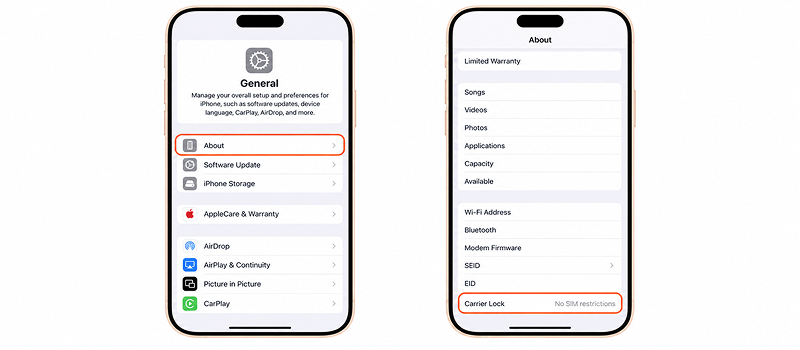
If you already have an iPhone and want to check its status, then this will take only a few clicks. Also, if you’re buying a new iPhone, then you should check it too:
- Go to Settings > General > About, then scroll down and look for “Carrier Lock.” It will say either “No SIM Restrictions” (unlocked) or name a specific carrier (locked).
- Or call your carrier and ask directly, and they are required to tell you.
If you financed your iPhone 18 through T-Mobile or Verizon this year, assume it’s locked until it’s paid off. And if you paid in full or used Apple Card Monthly Installments, it should already be unlocked.
Tip: Skip the paid “unlock my iPhone in 24 hours” websites and third-party services that pop up when you search this. They can’t actually remove a carrier lock; only your carrier can. At best, you are paying for something free; at worst, you are handing your IMEI and payment details to a scam site.
Why “Locked” iPhone Should Bother You: It Blocks Your Travel eSIM
The “Locked” iPhone is not just a technical problem; it can create real problems, especially when you are traveling to different countries. A carrier locked iPhone doesn’t just limit which carrier can text you back home, but it also limits everything you can do the moment your flight lands in another country.
John Brown, an Apple ecosystem strategist and technology consultant, put it simply, “A locked iPhone can prevent the simple path of adding a local eSIM.”
The problem is defined in this one sentence by John Brown. Every iPhone sold in the US since the iPhone 14 has shipped without a physical SIM tray, only eSIM. This feature normally is a good thing. However, if you have a locked phone on a home carrier, you won’t be able to scan a QR code and get online in minutes without hunting for a SIM card the next time you land in another country.
Cost Difference Is Another Limitation of a Carrier Locked iPhone
Here’s what staying locked into your carrier’s roaming actually costs versus what an eSIM costs once you are unlocked.
| Option | Price | Data | The Catch |
| Verizon TravelPass | $10/day | Standard speed, most countries | Still locked to one carrier |
| AT&T International Day Pass | $10/day | Unlimited High-speed | Still locked to one carrier |
| T-Mobile International Pass | $5/Day | 0.5GB before throttling | Slows to crawl fast |
| Maya Mobile eSIM 30-day plan | $1.67/day | Unlimited, 165+ countries | Needs an unlocked phone |
| Maya Mobile eSIM 3-day Plan | $3.33/day | Unlimited 165+ countries | Needs an unlocked phone |
For example, if you are going on a 2-week trip, then one route will cost $140 through your carrier for data that slows to a crawl once you hit the cap. And the one thing standing between you and the cheaper option is one setting on a carrier-locked iPhone.
If your iPhone 18 is unlocked, you can check which devices support Maya’s eSIM and see how eSIM actually compares to a physical SIM before your next trip, so you are not figuring any of this out at the gate.
How Do I Unlock My iPhone?
If you have a carrier locked iPhone and want to unlock it, then there is only one safe route. Contact your carrier directly and ask them to submit an unlock request. Each carrier has its own conditions and policies, but they generally share two things. Either the phone has to be paid off, or it has to be in good standing on the account ( not reported lost or stolen). Once it’s approved, unlocking happens in the cloud, and no store visit is required.
Stay Connected With an eSIM
An eSIM is a SIM built into your iPhone’s hardware, so you do not need to physically swap it in or out. You can buy a data plan, install it digitally, and it’s ready to go before you even land in another country. Here’s what that actually gets you when you travel with Maya:
- Get online within minutes of landing, no hunting for a local SIM vendor.
- Pick a plan that fits your trip from 3 to 30 days, all with unlimited data.
- Keep your home number working at all times. Your Maya eSIM runs alongside your regular SIM, not in place of it. So calls and texts still come through.
- Skip your carrier’s roaming charges. Maya Mobile’s eSIM plans start at $1.67/day, down from $10+/day.
- Running low on data? Top it up anytime from your account; it doesn’t expire until you use it up or delete it.
- Get real 24/7 human support if anything goes wrong.
Find eSIM plans for 165+ countries in the Maya store, or first check whether your iPhone is compatible.
Also Read: How To Travel On a Budget Without The Hidden Costs Eating It