Picking the right SIM while traveling can feel confusing, especially when you’re deciding between a physical SIM card and an eSIM. Both keep you connected, but they work differently and come with their own pros and cons. In this blog, we’ll compare eSIMs and physical SIM cards, explain how each works, and show why eSIM is quickly becoming a favorite for international travelers.
eSIM vs SIM: What’s the Difference?
Before we compare them, let’s quickly look at what each one is and how they work.
Physical SIM
A physical SIM is a small, removable chip you insert into your phone. Once it’s in the SIM slot, your device reads the card, registers it with the carrier’s network, and activates your mobile number so you can call, text, and use data. If you switch plans or providers, you usually swap the SIM for a new one.
eSIM (Embedded SIM)
An eSIM is a digital version of a SIM card built into your device. It stores your carrier details the same way, but instead of inserting a chip, you activate it by downloading a mobile plan through a QR code or app. Once installed, it connects you to the network automatically, and switching plans can be done right from your settings, no physical card needed.
Both options keep you connected, but you’ll notice the differences while traveling. Let’s compare how eSIM and SIM work when you’re on the move.
The Comparison: eSIM vs SIM for Travel
Let’s look at how they work, how they differ, and which one is more practical for travelers.
| Feature | eSIM | Physical SIM |
| Setup | Instant activation via QR code or app | Buy a SIM, insert it into the slot, and restart the phone |
| Activation Time | A few minutes with Wi-Fi | It can take longer, especially abroad |
| Flexibility | Switch plans remotely, no need to swap cards | Must carry or replace SIM cards manually |
| Availability | Supported in 100+ countries, growing quickly | Works everywhere, universally supported |
| Risk of Loss | None (built into the phone) | Easy to lose or damage, very small card |
| Dual SIM | Many phones support eSIM + physical SIM, or dual eSIM | Some phones allow dual SIM, but are limited |
| Device Support | Not all devices (esp. budget models) support eSIM yet | Works on all phones with SIM slots |
| Best For | Frequent flyers, digital nomads, multi-country trips | Budget travelers, short trips, and older phones |
If you’re considering going digital, here are 8 solid reasons eSIM could be your best travel companion.
8 Reasons Why eSIM Wins for Traveler
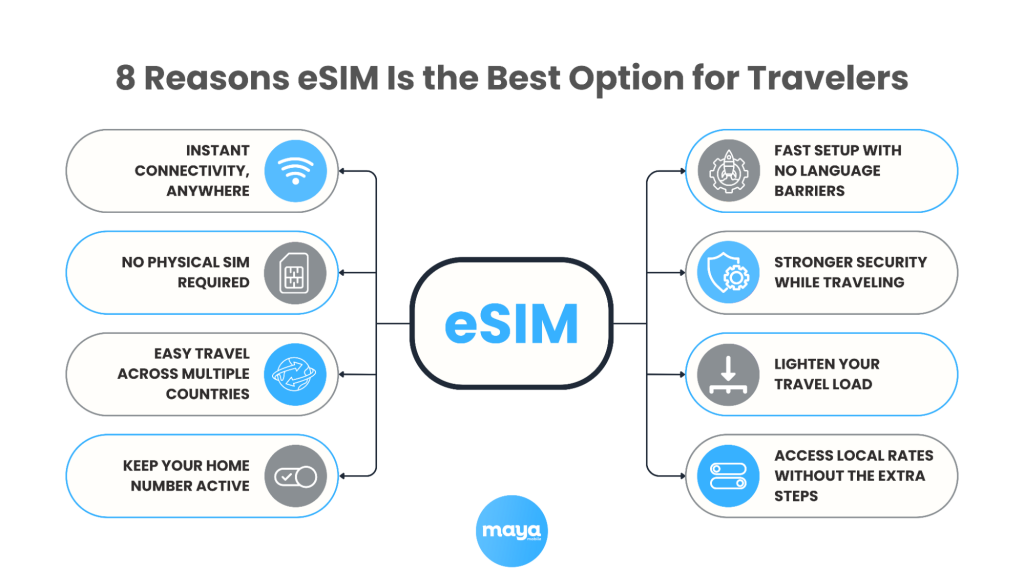
eSIM offers the most convenience for modern travel, but the best choice ultimately depends on how you prefer to stay connected. What matters most is getting online quickly and without extra hassle, wherever you land.
What to Consider Before Using an eSIM
- Device compatibility: Not all phones support eSIM yet. Make sure yours does (we’ll list some below).
- Carrier support: Your mobile provider must support eSIM, both your current one and the travel eSIM provider you choose.
- Internet required to activate: You’ll usually need a Wi-Fi connection to activate a new eSIM profile.
- Limited slots: Most phones allow you to use one eSIM and one physical SIM simultaneously, although some newer models support dual eSIMs.
- No physical backup: If you lose access or accidentally modify the eSIM profile, recovery may take longer than simply swapping a SIM card.
Ready to try one? Here’s how to set up an eSIM on your device without any hassle.
How to Set Up an eSIM
Steps to Activate (general process, may vary by provider):
- Choose a travel eSIM provider that supports your destination.
- Purchase a plan online and receive a QR code or app download.
- Scan the QR code or install the eSIM profile from settings.
- Label your plan (e.g., “Japan Travel”) and enable roaming if needed.
Device Notes
- iPhone: Works on iPhone XS or later (iOS 12.1+).
- Android: Supported on newer Samsung, Google Pixel, and other flagship devices.
Common Troubleshooting Tips
- eSIM not activating: Ensure your phone is unlocked, connected to Wi-Fi, and restart after setup.
- No service: Manually select a network in settings if it doesn’t connect.
- Deleted eSIM profile: Most providers allow re-download; otherwise, contact support.
- Switching back: You can toggle between eSIM and physical SIM in your settings anytime.
Once your eSIM is set up and running, a little preparation before your trip will make sure everything goes smoothly.
Traveler’s Checklist Before You Go
Before you head out, here are a few quick things to check off your list.
- Download your eSIM ahead of time: Set up your eSIM while you still have a stable Wi-Fi connection at home or in your hotel. This avoids activation issues when you land.
- Save your QR code safely: Keep a copy of the QR code or activation details. Print it or save it on another device in case your phone loses connection.
- Learn how to switch between SIMs: Check your phone settings for managing multiple SIMs. Knowing how to toggle between your home SIM and travel eSIM makes switching smooth.
- Store your physical SIM securely: If you remove your regular SIM, keep it in a safe place like a SIM holder or wallet slot to avoid losing it.
The Smart Traveler’s Takeaway
Choosing between an eSIM and a physical SIM depends on your travel habits, device compatibility, and how you prefer to stay connected. For most international travelers, eSIM offers a faster and more flexible way to access mobile service across borders.
With Maya Mobile, you don’t have to search for shops or swap cards after you land. You can install your plan before you fly, activate it in minutes, and stay connected in 190+ countries. Whether you’re gone for a few days or a few months, your data travels with you, no detours, no delays.
Related Reads
- Step-by-Step eSIM Troubleshooting Guide for Beginners
- Accidentally Deleted eSIM? Here’s What to Do Next
- Easy Guide on How to Transfer eSIM from One Phone to Another
FAQs on Choosing Travel-Friendly SIM
1. Is it better to get an eSIM or a local SIM?
eSIMs can’t be removed if your phone is lost or stolen, making them safer than physical SIMs. You also don’t have to carry or swap cards, and many supported phones let you use two eSIM plans at the same time.
2. Does eSIM drain battery?
An eSIM doesn’t drain more battery than a physical SIM. Power use depends on signal strength and phone activity, not the SIM type. Battery drain is more noticeable when two SIMs are active or when network conditions and settings increase demand.
3. Can I have both an eSIM and a physical SIM?
Yes, you can use an eSIM and a physical SIM at the same time on a dual-SIM device. This lets you manage two numbers or plans, useful for travel or separating work and personal use. Just scan the eSIM and keep the physical SIM in place.
4. What is the risk with eSIM?
Fraudulent activities: Bad actors clone eSIM profiles to make unauthorized calls, exploit access to sensitive information, and engage in financial fraud. Online identity theft: Fraudsters can copy and clone eSIM profiles without your knowledge or consent.
5. Does an eSIM lock your device?
It does not have any physical component that needs to be installed or removed from your phone, unlike a physical SIM card. When you install an eSIM, it will not affect the lock status of your phone.